In Cinema 4D, the group of tools marked in purple in the toolbar is called Deformers. These tools change the shape of objects by applying deformations such as bending, twisting, stretching and more. Deformers work as separate objects that you apply to other objects in the hierarchy. They are especially useful for creating complex shapes and animations. A deformer goes inside the object (as its child). If you can’t see the deformer’s frame in the viewport, turn it on in Filter → Deformer.
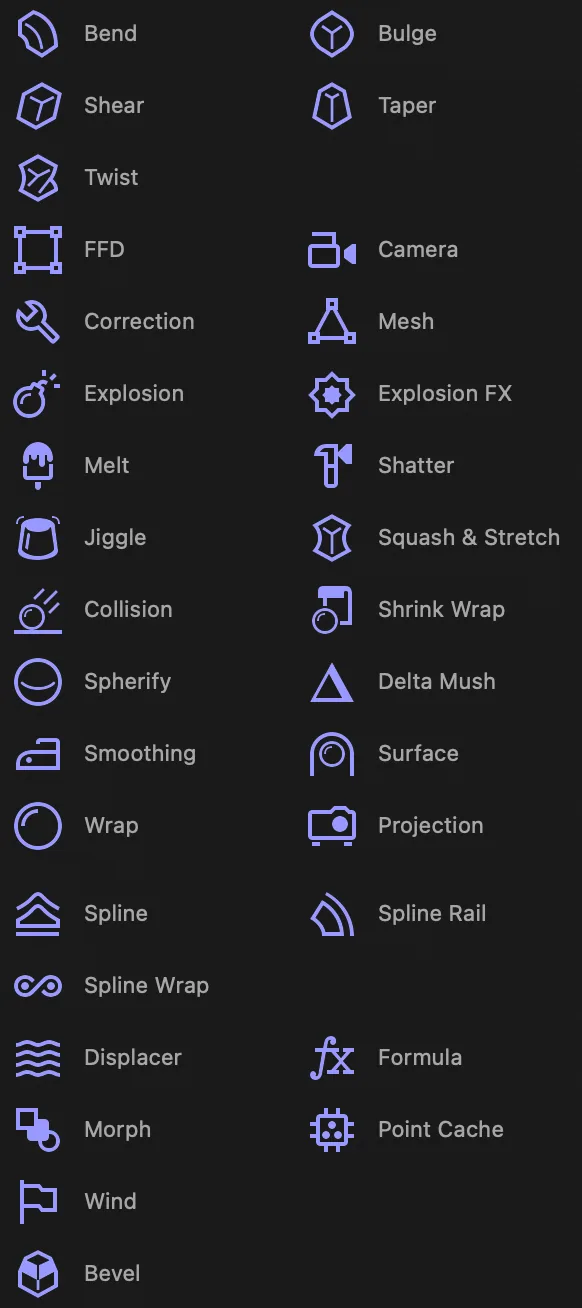
Bend
- Purpose: Bends an object along one axis. You can control the bend angle and direction and limit the area it affects.
- Use: Used for arches, curved pipes, roads and other objects that need a smooth bend.
Shear
- Purpose: Shifts an object along one axis, creating a slant. You can control the shear angle and direction.
- Use: Good for slanted surfaces or asymmetric shapes.
Twist
- Purpose: Twists an object around one axis. You can set the twist angle and limit the area it affects.
- Use: Good for spirals, corkscrews, twisted cables and other objects with a helical structure.
FFD (Free Form Deformation)
- Purpose: Deforms an object with control points, creating smooth changes in shape.
- Use: Used to fine-tune the shape of objects such as characters, furniture or complex models.
Correction
- Purpose: Lets you manually adjust the points of an object that has already been changed by other deformers or generators: you can move points on top of the current shape, as on an editable mesh, without making the object editable.
- Use: Good for fine-tuning a shape — for example, fixing a crease after a Bend or moving individual points of a parametric object.
Explosion
- Purpose: Breaks an object into pieces and scatters them in different directions, creating an explosion effect.
- Use: Used for animations of destruction, explosions or flying debris.
Melt
- Purpose: Creates the effect of an object melting away.
- Use: Good for melting animations, such as melting ice or wax.
Jiggle
- Purpose: Adds a jiggling or vibrating effect to an object.
- Use: Good for animations such as wobbling jelly or vibrating objects.
Collision
- Purpose: Lets an object deform when it collides with other objects.
- Use: Good for realistic interactions, such as a ball hitting a wall.
Spherify
- Purpose: Turns an object into a spherical shape.
- Use: Used for “inflating” effects or turning objects into spheres.
Smoothing
- Purpose: Smooths and evens out an object’s mesh: removes sharp changes and makes the distribution of points more uniform. Modes: Smoothing, Relax (evens out the distances between points) and Stiffness (tends to keep the original shape).
- Use: Good for softening sharp shapes after other deformers (for example, Displacer or Collision) or “relaxing” an uneven mesh without remodeling it. You can limit its strength with a field or a vertex map.
Wrap
- Purpose: Wraps an object into a cylinder or a sphere (Cylindrical and Spherical modes): a flat surface rolls up into a tube or a ball. The size of the unwrapped area, the radius and the wrap angle are adjustable.
- Use: Good for wrapping a flat object around a shape: a label on a bottle, text in a circle, a ribbon around a cylinder. To make an object hug the surface of another object, use Shrink Wrap or Surface.
Spline
- Purpose: Deforms an object’s surface using two splines: the Original Spline sets the original contour, the Modifying Spline sets the new one. The geometry along the contour adapts to the shape of the second spline.
- Use: Good for changing a model’s profile with a drawn curve: bending the edge of a cloth, a surface or an object’s outline. To make an entire object follow a spline (wires, ribbons, text along a curve), use Spline Wrap.
Spline Wrap
- Purpose: Lets you “wrap” an object along a spline to create complex shapes.
- Use: Used for ribbons, roads, pipes and other objects that follow a curve.
Displacer
- Purpose: Deforms an object based on a texture or noise, creating complex surfaces.
- Use: Good for relief surfaces such as mountains, waves or textured objects.
Morph
- Purpose: Lets you create smooth transitions between different states of an object.
- Use: Good for shape-change animations such as facial expressions.
Wind
- Purpose: Creates a wind effect that deforms an object, for example cloth or hair.
- Use: Used for dynamic animations such as waving flags or hair.
Bevel
- Purpose: Creates rounded or chamfered edges on objects. It adds extra polygons along the edges, making them smoother and more realistic.
- Use: Bevel is widely used in modeling to improve how objects look: sharp edges are rare in real life, and rounded or chamfered edges look more natural.
Bulge
- Purpose: Creates a bulge or a dent on an object’s surface. You can control the strength and the area it affects.
- Use: Good for inflating effects, dents or other local deformations.
Taper
- Purpose: Narrows or widens an object along one axis. You can control the amount of taper and its shape.
- Use: Used for cone-like shapes such as bottles, columns or tapering pipes.
Camera
- Purpose: Deforms objects depending on the position and direction of the camera. This deformer lets you change how objects look, creating interesting visual effects.
- Use: The deformer applies deformation to objects based on the camera’s position, which makes dynamic and interactive scenes possible. It is especially useful for animation where camera movement has to be taken into account. Controlling deformation points: you can move the deformation points to fine-tune exactly how the object looks through the camera. This can include changing the object’s shape, size and other parameters.
Mesh
- Purpose: Used in 3D modeling to deform objects based on another mesh. This deformer lets you transfer deformations from one object to another, which makes it useful for animation and modeling.
- Use: The Mesh deformer lets you use any mesh as a cage to deform another object. This means any closed object can serve as the basis for changing the shape of another object, which will follow its contours.
Explosion FX
- Purpose: Breaks an object into fragments and scatters them with adjustable force, rotation and gravity. It gives more control than the simple Explosion: you can set the size and thickness of the fragments and the direction and moment of the explosion.
- Use: Good for destruction scenes: a product exploding in an ad, a logo flying apart, an object shattering. This deformer doesn’t create smoke or sparks — those are added separately, for example with particles or at the compositing stage.
Shatter
- Purpose: Breaks an object into individual polygons that fall and fly apart, as if the object were crumbling.
- Use: Good for falling-apart and assembling animations: text or a logo crumbles into pieces and comes back together. The strength and direction of the scatter are set by the deformer’s parameters and its area of effect.
Squash & Stretch
- Purpose: Lets you squash and stretch an object along one axis.
- Use: Used for cartoon animations such as a bouncing ball.
Shrink Wrap
- Purpose: Deforms an object so that it “wraps” around another object.
- Use: Used for wraps such as packaging or film.
Delta Mush
- Purpose: smooths deformations on objects while preserving their surface details. It is especially useful for character animation, sculpting or any other task where you need to keep a model’s fine details after applying deformations.
- Use: Smoothing deformations: Delta Mush helps remove unwanted distortions that can appear when objects are animated or deformed. Preserving details: Unlike other smoothing tools, Delta Mush keeps fine surface details such as folds, wrinkles or textures. Flexible settings: You can control the smoothing strength, the radius of influence and other parameters to get the result you need. Works with different object types: Delta Mush can be applied to polygon objects as well as to sculpted objects.
Surface
- Purpose: Projects one object onto the surface of another. It lets you create dynamic animations and visual effects that follow the shape of the target object.
- Use: The deformer makes one object follow the shape of another, which is useful for realistic animations and effects. For example, you can make a plane follow the relief of a landscape, cloth or liquid.
Projection
- Purpose: Projects the shape of one object (for example, text or a spline) onto the surface of another object (for example, clothing or a landscape). This is useful for realistic textures and interaction effects.
- Use: Used to project text logos or patterns onto clothing or other objects, creating a “sticker” effect. Animating objects: it is used to animate objects that need to follow the shape of other objects, creating dynamic scenes.
Spline Rail
- Purpose: Deforms an object to fit a shape defined by 1, 2 or 4 “rail” splines (Z Spline Left / Right, X Spline Left / Right). The object adapts to the contour between them.
- Use: Good for “pushing” an object through a shape drawn with curves: for example, squeezing a cube into a funnel or giving an object the silhouette you need. The Limited, Within Box and Unlimited modes set where the deformation applies.
Formula
- Purpose: Deforms an object based on a mathematical formula.
- Use: Used for complex, programmable deformations. The Formula deformer can be used for animations where an object’s shape changes over time, imitating effects such as moving liquid or oscillations.
Point Cache
- Purpose: Stores and plays back the animation and deformations of objects. It records changes in the positions of an object’s points and then plays them back without recalculating, which makes working with resource-heavy animations much easier.


